
Embedded AI SDK
Overview
The Embedded AI SDK allows payment portal users to manage Findustry AI workflows from existing user interfaces. The first release makes the Chargeback Agent available for reviewing, responding to, and resolving chargeback disputes. The embedded agent shows the status of chargebacks and allows users to review, modify, or approve AI-generated responses, such as by uploading new evidence or revising response letters, through a modal or sidebar presentation.
Installation
npm
npm install @findustryai/embedCDN
<script src="https://embed.findustryai.com/embed.js"></script>
The CDN build adds window.FindustryAI for script usage.
Configuration
Initialize the SDK once per page load, typically at application startup.
The token is a time-restricted access token signed by the
secret key. See SDK authentication.
import { FindustryAI } from "@findustryai/embed";

const findustryAI = new FindustryAI({
  environment: "test",
  token: "eyJ…"
});| Option | Type | Required | Description |
|---|---|---|---|
environment |
string | No | 'test' or 'production' (default) |
theme |
string | No |
'light', 'dark', or 'auto' (default; OS preference)
|
token |
string | Yes | Time-restricted access token signed by secret key |
Display Options
The agent supports two primary display modes through the optional mode parameter.
Modal
The agent appears as a centered dialog overlaying the current page, with a semi-transparent backdrop.
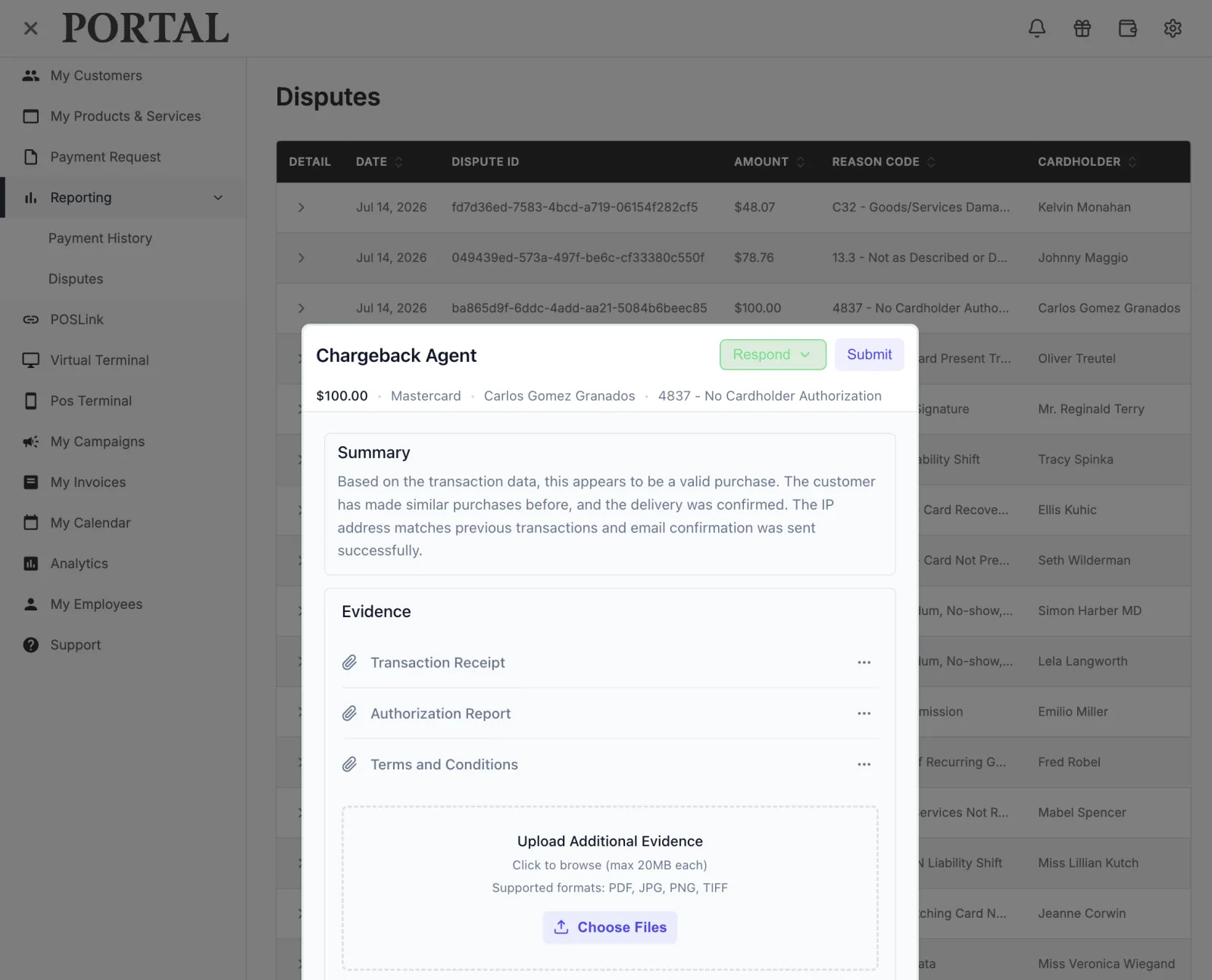
findustry.chargebackAgent.open({
  chargebackId: "chb_12345",
  mode: "modal",    // default — can be omitted
  onResolved: (result) => {
    console.log(result.status);
    // 'won' | 'lost' | 'pending' | 'cancelled'
  },
});
Drawer (Sidebar)
The agent slides in from the right edge of the viewport, full height, alongside the existing page content.
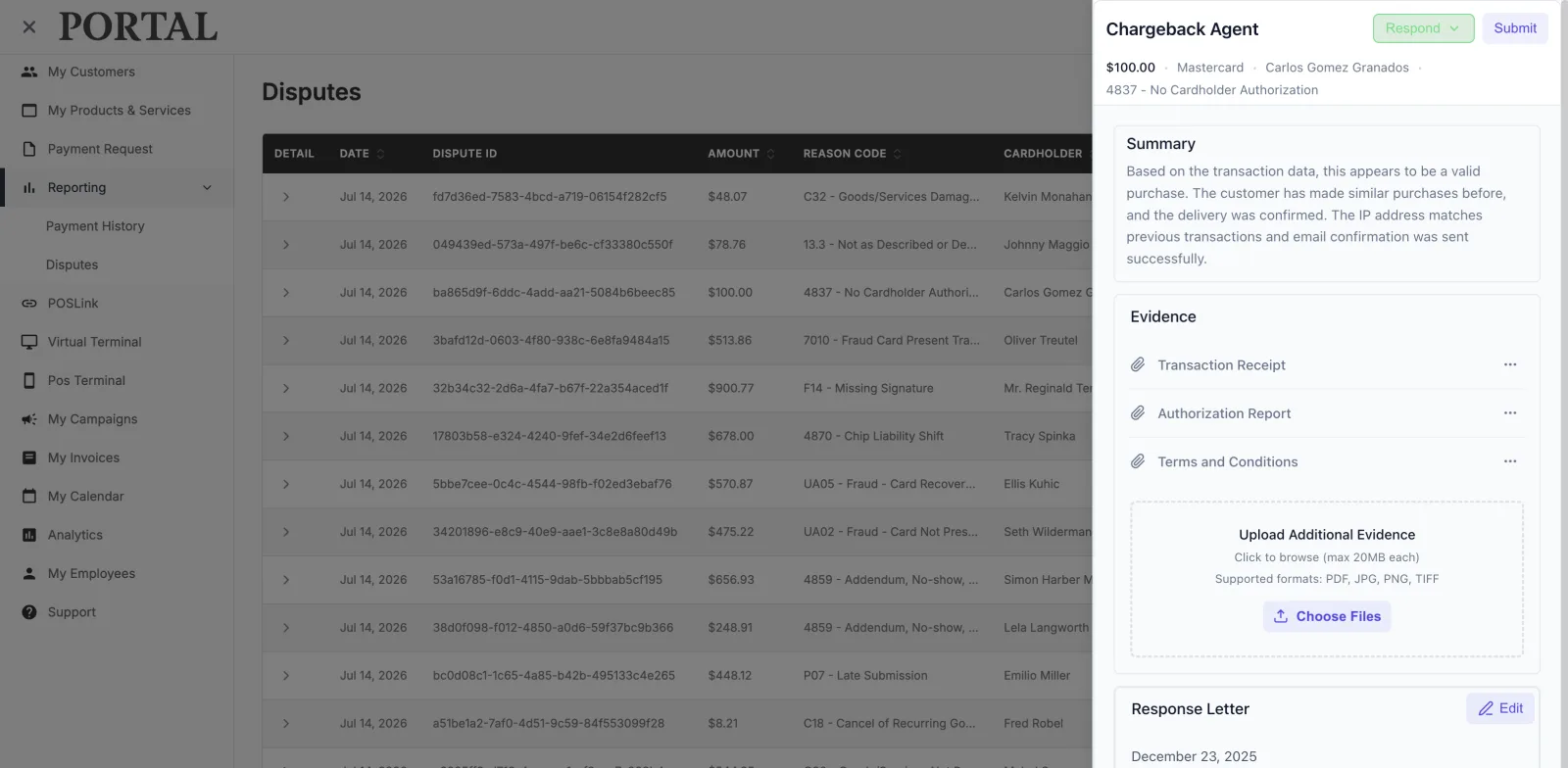
findustry.chargebackAgent.open({
  chargebackId: "chb_12345",
  mode: "drawer",
  onResolved: (result) => {
    // Refresh your table on resolution
  },
});
SDK Integration Patterns
Vanilla JavaScript
const findustryAI = new FindustryAI({
  token: "eyJ…"
});

document.querySelectorAll("[data-chargeback-id]")
  .forEach((btn) => {
    btn.addEventListener("click", () => {
      findustryAI.chargebackAgent.open({
        chargebackId: btn.dataset.chargebackId,
        mode: "modal",
        onResolved: (result) => {
          // Re-fetch the dispute row
        },
        onClose: () => {
          // User dismissed without completing
        },
        onError: (error) => {
          console.error(error.code, error.message);
        },
      });
    });
  });
React Hook
import { useFindustryAI } from "@findustryai/embed/react";

function DisputeList({ disputes }) {
  const { openChargebackAgent } = useFindustryAI({
    token: "eyJ…"
  });

  return (
    <ul>
      {disputes.map((dispute) => (
        <li key={dispute.id}>
          <span>{dispute.id}</span>
          <span>{dispute.amount}</span>
          <button
            onClick={() =>
              openChargebackAgent({
                chargebackId: dispute.id,
                mode: "drawer",
                onResolved: (result) => {
                  // Update status
                },
              })
            }
          >
            Manage
          </button>
        </li>
      ))}
    </ul>
  );
}
CDN (No Build Step)
<script src="https://embed.findustryai.com/embed.js"></script>
<script>
  const findustryAI = new FindustryAI({
    token: "eyJ…"
  });

  function openDisputeAgent(chargebackId) {
    findustryAI.chargebackAgent.open({
      chargebackId: chargebackId,
      mode: "modal",
      onResolved: function (result) {
        alert("Chargeback " + result.status);
      },
    });
  }
</script>

<button onclick="openDisputeAgent('chb_123')">
  Manage Dispute
</button>
Embedding the Button in a Chargeback Table
Add a per-row action button in the rightmost column of an existing
disputes table. Wire the row’s chargeback identifier into chargebackAgent.open() and refresh the row from onResolved.
import { useFindustryAI } from "@findustryai/embed/react";

function DisputesTable({ disputes, refetch }) {
  const { openChargebackAgent } = useFindustryAI({
    token: "eyJ..."
  });

  return (
    <table>
      <thead>
        <tr>
          <th>Dispute</th>
          <th>Amount</th>
          <th>Status</th>
          <th>Action</th>
        </tr>
      </thead>
      <tbody>
        {disputes.map((d) => (
          <tr key={d.id}>
            <td>{d.chargebackId}</td>
            <td>{d.amount}</td>
            <td>{d.status}</td>
            <td>
              <button
                onClick={() =>
                  openChargebackAgent({
                    chargebackId: d.chargebackId,
                    mode: "modal",
                    onResolved: () => refetch(),
                  })
                }
              >
                Manage
              </button>
            </td>
          </tr>
        ))}
      </tbody>
    </table>
  );
}
Chargeback Agent API
chargebackAgent.open(options)
Opens the agent in the configured display mode.
| Option | Type | Required | Description |
|---|---|---|---|
chargebackId |
string | Yes | The chargeback identifier from your system |
mode |
string | No | 'modal' (default) or 'drawer' |
onResolved |
function | No | Called when the agent completes the workflow |
onClose |
function | No | Called when the agent is dismissed |
onError |
function | No | Called on load or processing errors |
chargebackAgent.close()
Closes the agent programmatically, triggering the close animation and the onClose callback.
chargebackAgent.isOpen()
Returns true if the agent is currently displayed.
Resolution Result
The onResolved callback receives a result object:
{
  status: "won" | "lost" | "pending" | "cancelled";
  chargebackId: string;
  resolution?: string;
  timestamp: string; // ISO 8601
}
Agent SDK Events
The Agent SDK emits lifecycle events that integrate with your application’s own event tracking.
// Agent opened
findustryAI.on("modal:open", () => { /* ... */ });

// Agent closed
findustryAI.on("modal:close", () => { /* ... */ });

// Chargeback resolved
findustryAI.on("chargeback:resolved", (result) => {
  analytics.track("chargeback_resolved", result);
});

// Any SDK error
findustryAI.on("error", (error) => {
  monitoring.captureError(error);
});
Content Security Policy
The SDK renders a sandboxed Findustry AI iframe in your page’s DOM
and communicates with it via postMessage with origin
validation. If your portal enforces a Content Security Policy, add the
following to frame-src:
frame-src https://embedded.findustryai.com https://embedded.test.findustryai.com;| Environment | Host |
|---|---|
| Production | https://embedded.findustryai.com |
| Test | https://embedded.test.findustryai.com |
TypeScript Support
Full TypeScript declarations are included:
import type {
  FindustryAI,
  FindustryAIConfig,
  ChargebackAgentOptions,
  ChargebackResult,
  ModalMode,
} from "@findustryai/embed";
Agent SDK Lifecycle
Destroy the Agent SDK instance when tearing down your application (e.g., SPA route change to a page that no longer uses the agent):
findustry.destroy();This closes any open agent, removes event listeners, and releases DOM resources.